
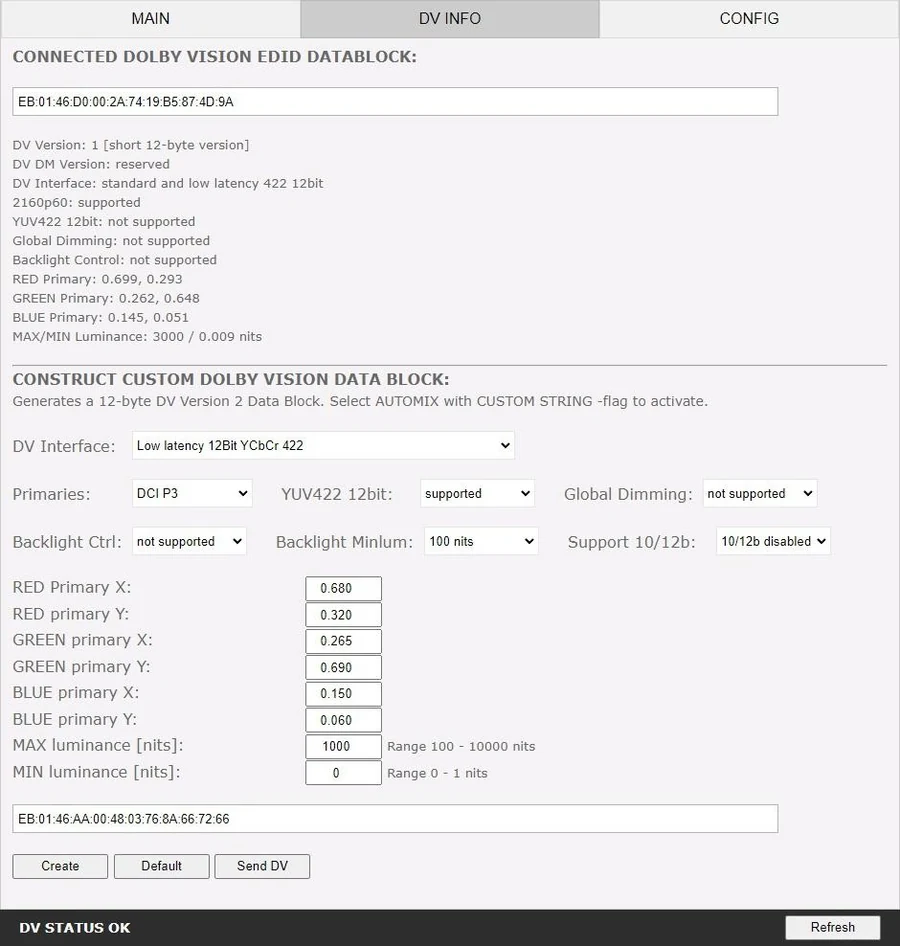
Connected Dolby Vision data block
The unit automatically sniffs, displays and saves any Dolby Vision mandatory string from a sink connected at the TX output. Once stored, that string can be used in automix to make sure the DV stream from the source is compatible with the sink.
This is what makes an AVR or processor in the middle survivable: once the DV string of a display is saved, you can insert other equipment into the chain and still pass the right DV signal through to the sink. The data block value is also deciphered into human-readable form.
Constructing a custom data block
If the DV flag on the EDID page is set to CUSTOM, the string created and saved on this form is what gets used. Only the resulting DV string is stored in unit memory — each individual value in the form resets to default once the custom DV string has been created and saved.
- DV Interface — the type of DV interface to use in the data block.
- Primaries — which primaries to advertise.
- YUV422 12bit — enable or disable support.
- Global Dimming — enable or disable support.
- Backlight Ctrl — enable or disable backlight control support.
- Backlight Minlum — minimum luminance for backlight: 25, 50, 75 or 100 nits.
- Support 10/12b — disable or enable support for 444/RGB 10-bit or 12-bit.
Custom primaries
If Primaries is set to CUSTOM, these values can be set individually: RED primary X and Y, GREEN primary X and Y, BLUE primary X and Y, MAX luminance from 100 to 10000 nits, and MIN luminance from 0 to 1 nits.
The buttons
- Create IF — build the custom DV data block from the values above.
- Default IF — load the default custom DV data block values.
- Send DV — store the created string in unit memory, for use when the DV flag is set to CUSTOM.
- REFRESH — reload the current page.
For the practical side of Dolby Vision and LLDV workflows, see the Dolby Vision EDID guide and the DV FAQ.